
An AI food photo app reads a picture of a plate and turns it into foods and amounts. Sito is an AI food photo app built for children: you snap your child's meal, and we list each food with a portion sized for their age. You check the list, and the meal lands in that child's day, which tracks 18 nutrients, from calories to iron, calcium and zinc. Here is how it works, step by step, and how to get a better read from every photo.
- Sito is an AI food photo app built for kids: snap the plate and we list each food with a portion sized for your child's age.
- You check and fix any portion before saving, then the meal lands in that child's day, which tracks 18 nutrients.
- Adult photo calorie apps are built around adult goals, and children need energy to grow.
Sito: an AI food photo app built for your child's plate
Sito is our app, and every child in the family gets their own profile. When you snap a meal, our AI is told that child's age and a typical portion for it, so a toddler's plate is read in toddler amounts.
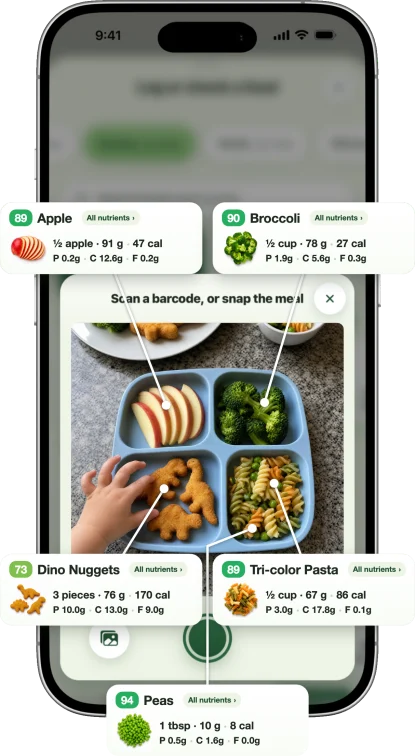
The meal opens on a screen you can edit, where each food has an amount field and unit chips. You can remove a row, star a favorite, or tap Add food for anything the photo missed. Foods we score show a chip out of 100, and a tap opens the score card.
When the list looks right, tap Log meal. It saves to that child's day, and their day tracks 18 nutrients. Your partner can log meals from their own phone, so the meals they serve land in the same day.
Snap your child's next meal
Take a photo and Sito lists each food, sizes the portions for your child's age and adds the meal to their day's nutrients.
How does an AI food photo app work? Step by step in Sito
- Tap the center button to open "Log or check a food" for the child you have selected, then choose Camera, which says "Photo or barcode".
- Snap the plate. One camera does both jobs: it picks up a barcode live, or it reads the meal. You can also pick a photo from your library, and we read it the same way.
- The screen names each step as it goes, such as "Reading the plate" and "Working out the numbers". We open the meal as soon as it is ready.
- Each food comes back as its own row with an amount. A home-cooked dish is split into its ingredients, with likely oil and salt scaled to your child.
- Check the portions: change a number or a unit, remove a row, or add what is missing.
- Tap Log meal, and it goes into that child's day, on the day the diary shows.
How does the AI know a child's portion?
Our AI gets your child's age from their profile, along with a typical portion for that age. For a toddler of 1 to 2, that is a quarter to a half cup per food, and for ages 2 to 5, a half to three quarters of a cup.
The American Academy of Pediatrics gives parents a simple rule of thumb: a toddler's serving "should be approximately one-quarter of an adult's" (HealthyChildren.org). We keep a fuller guide in portion sizes by age.
Cut fruit is counted as whole pieces, so four strawberry halves are two strawberries, not four.
One more check can run before you save. If a single food alone is more than your child's whole day of calories, we ask "Is that portion right?" with a "Let me check" button. It is there to catch a typo in an amount or a unit, never to judge what your child ate.
What happens after you log the meal
The meal joins that child's day. The day sums 18 nutrients from the log: calories, protein, carbohydrates, fat, fiber, sugar, sodium, iron, calcium, zinc and more. Our AI names each food and its amount, and the nutrient numbers come from food data. A brand is checked against our own product table first. A basic food is matched first against USDA data from FoodData Central, which USDA calls its "comprehensive source of food composition data".
The calorie target is built on the National Academies' 2023 energy equations, which use your child's age, sex, height, weight and activity. If a doctor or dietitian gave you a number, enter it and we use yours instead. You can see the same math in our kids calorie calculator.
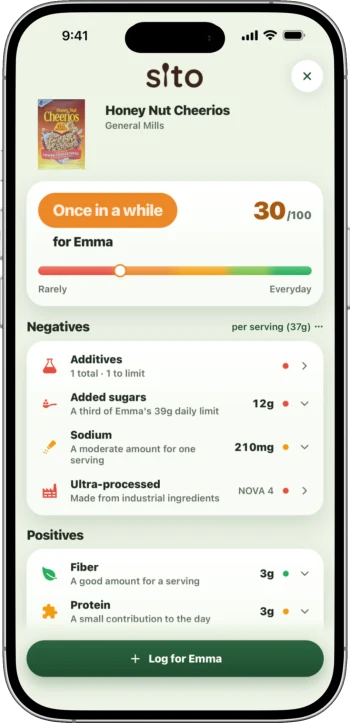
Foods we score show a 0 to 100 chip. For a packaged product and a child under 6, the chip shows the under-6 score, where additives flagged for young children count one class higher. Our score page and additive table explain the rules.
A few more things help on a busy night. With two or more children, you can copy a meal to a sibling and adjust the portions before logging. And when a plate comes back half full, "How much came back?" lets you mark the share not eaten, and it comes off the meal. Leftovers are logged, not judged. Every Sunday, a Weekly Report sums up the week for each child. See food diary for kids for how the days add up.
Why not an adult AI calorie counter?
Adult photo calorie apps are built around adult goals, not a child's needs by age. Children are different, and the AAP says children "should not be on calorie-restricted diets unless recommended by a doctor" (HealthyChildren.org).
A child's energy target is also built differently: the National Academies' equations for birth to 18 include "an allowance for growth" (DRI for Energy, 2023). Sito uses those equations. We look at the adult apps in Cal AI for kids and MyFitnessPal for kids.
Tips for a better food photo
- Whole plate in frame. When a photo comes back with no food, the app names the usual causes: steam, low light, or a plate shot from very close. One step back, with the whole plate in frame, usually does it.
- Mixed dishes hide things. A review of food photo research notes that mixed ingredients, as in a salad, soup or burger, often "cannot be optically divided" (Dalakleidi et al., 2022). In a bowl, stacked food can hide some items too (Fatehah et al., 2018). Check the rows for a casserole or a stew.
- Add the drink and the sauce. In the same 2018 study, drinks and condiments "tended to be omitted" by the nutrition professionals reading the photos. Tap Add food and put them in.
- Packaged snack? Scan it. When a photo includes a packaged item, the meal screen can suggest scanning its barcode next time. A barcode scan opens the score card, with a button to log it for your child.
Other ways to log: barcode, search, describe
A photo is not the only way in. Hold the camera over a barcode and it opens the score card, ready to log. The search bar finds foods and scores by name. Or open the AI Writer and type what they ate. The Writer reads your words with your child's age too, so "half a banana and toast" comes back sized for them. More on scanning in food scanner app for kids.
For babies, the AAP recommends only breast milk for about the first 6 months (HealthyChildren.org). Logging in Sito starts around 6 months, with solids. Once your child is eating meals, Sito picks up from there.
A word on the log itself. In the AAP's words, "It's a parent's responsibility to provide food, and the child's decision to eat it" (HealthyChildren.org). The log shows you the pattern. An app cannot diagnose. If you are concerned about your child's diet, talk with your pediatrician.
FAQ
Can an app tell what my child ate from a photo?
Sito reads the plate and names each food with an amount, sized for your child's age. A home-cooked dish is split into its ingredients. The nutrient numbers then come from food data: our own product table first for brands, and USDA data first for basic foods. You check the list and fix anything before it saves.
Does the app know a toddler eats less than an adult?
Yes. Sito's AI is told the child's age and a typical portion for it, such as a quarter to a half cup per food for ages 1 to 2. The AAP's rule of thumb is that a toddler's serving is about a quarter of an adult's.
Can I fix a portion or add a sauce the photo missed?
Yes, on the meal screen before you save. Each food has an amount field and unit chips. Drinks and sauces are easy to miss in a photo, so tap Add food and put them in. You can also use a photo you took earlier from your library.
Sources
- HealthyChildren.org (AAP), Serving Sizes for Toddlers. healthychildren.org
- HealthyChildren.org (AAP), Energy In: Recommended Food and Drink Amounts for Children. healthychildren.org
- National Academies, Dietary Reference Intakes for Energy (2023). ncbi.nlm.nih.gov
- HealthyChildren.org (AAP), Picky Eaters. healthychildren.org
- HealthyChildren.org (AAP), Starting Solid Foods. healthychildren.org
- Dalakleidi et al., Advances in Nutrition, 2022. pmc.ncbi.nlm.nih.gov
- Fatehah et al., Nutrients, 2018. pmc.ncbi.nlm.nih.gov
- USDA FoodData Central. fdc.nal.usda.gov